Facebook Messenger Blue Circle Explained: What Every Icon Means

Confused by the blue circle and other icons on Facebook Messenger? From sending and sent to delivered, seen and active, each icon tells you something different. Learn what Messenger statuses actually confirm—and what they don’t prove about your messages.
You sent the message. You saw the blue circle. And now you're wondering: Did it actually go through, or is Messenger still trying to send it?
That tiny Facebook Messenger blue circle can tell you exactly where your message stands, but only if you know which version of the icon, you're looking at. From an empty circle to a checkmark, a filled circle, and finally the recipient's profile picture, each stage tells a different story.
But here's the bigger question: What happens when millions of customer conversations move through channels like Messenger, WhatsApp, Voice and RCS? For businesses, understanding conversation status is just the beginning. The real opportunity is turning every customer interaction into a faster, smarter, and more automated experience.
That's where Chat360 comes in. With an Enterprise Agentic AI Platform, Chat360 helps businesses automate customer conversations across WhatsApp, Voice, RCS and other channels, enabling AI Agents to engage customers, answer questions, qualify leads, provide support and drive conversions at scale.
Your customers are already having conversations. The question is whether your business is ready to automate them. Explore how Chat360 can turn customer conversations into intelligent, automated experiences.
Quick Answer: What Does the Facebook Messenger Blue Circle Mean?
The Facebook Messenger blue circle usually appears while Messenger is processing the status of a message.
Here is the basic sequence:
Messenger indicator | What it means |
Empty blue circle | Message is still sending |
Blue circle with a checkmark | Message has been sent |
Filled blue circle with a checkmark | Message has been delivered |
Recipient's small profile picture | Message has been seen |
These Messenger icons represent different stages of a Messenger message status. The most important thing to remember is that Sent, Delivered, and Seen are not the same thing.
Facebook Messenger Blue Circle: The Complete Message Flow
The easiest way to understand the Facebook Messenger blue circle is to follow what happens after you tap Send.
[ You Press Send ]
↓
[ Sending ]
Empty Blue Circle
↓
[ Sent ]
Blue Circle + Checkmark
↓
[ Delivered ]
Filled Blue Circle + Checkmark
↓
[ Seen ]
Recipient's Profile Picture
This is the core Messenger message status sequence.
One important correction is necessary here. It is tempting to describe every step using technical questions such as "Has it reached Facebook's servers?" or "Has it arrived on the recipient's device?" Meta's user-facing documentation defines these states by what the icons indicate, not by publishing the exact backend process behind each state.
So, for an accurate explanation, use Sending → Sent → Delivered → Seen rather than treating the technical delivery path as confirmed implementation detail.
1. Empty Blue Circle: Your Message Is Still Sending
The first Facebook Messenger blue circle you may see is an unfilled or empty circle.
It means Messenger is still sending the message.
If the circle stays in this state longer than expected, the problem may be related to your connection, the Messenger app, or another temporary issue affecting message sending.
What this Messenger message status tells you
An empty circle means the message has not yet progressed to the next confirmed status.
At this point:
Do not assume the recipient has received the message.
Do not assume the recipient has seen it.
Check whether your internet connection is working.
If the status remains stuck, try refreshing or reopening Messenger.
The empty circle is therefore different from the blue circle with a checkmark.
Why does the Facebook Messenger blue circle stay empty?
A short delay can happen while Messenger is attempting to send the message. If the problem continues, Messenger's own troubleshooting guidance recommends checking your connection, updating the app, and restarting the device or app where appropriate.
This is one reason understanding Messenger icons are useful. The visual state can tell you whether you should wait or investigate a sending problem.
2. Blue Circle with a Checkmark: Message Sent
The next Facebook Messenger blue circle state is an open blue circle containing a checkmark.
This means the message has been sent.
It does not mean the message has necessarily been delivered or seen.
That distinction is critical because many explanations online incorrectly treat the Sent and Delivered states as identical.
What does Sent mean?
The Sent Messenger message status means Messenger has confirmed that the message was sent.
However, the recipient's profile picture has not appeared as the Seen indicator, and the filled Delivered state has not necessarily been reached.
This is why a blue circle with a checkmark should not be interpreted as "they have read my message."
The Messenger icons are designed to distinguish these stages.
Sent does not mean Seen
Suppose you send:
"Can you call me when you're free?"
You see the blue circle with a checkmark.
That tells you the message has been sent. It does not confirm that the recipient opened the conversation or viewed the message.
This is one of the most important differences between the Facebook Messenger blue circle states.
3. Filled Blue Circle with a Checkmark: Message Delivered
The next Facebook Messenger blue circle state is a filled circle containing a checkmark.
This represents Delivered.
Delivered is further along the Messenger message status sequence than sent, but it still does not mean Seen.
A message can therefore be delivered while the recipient has not opened the conversation.
Delivered vs Seen
This distinction matters because users often see the filled circle and immediately assume the recipient has read the message.
That conclusion is not supported by the icon itself.
The Messenger icons distinguish delivery from viewing:
Delivered: Messenger has registered delivery.
Seen: Messenger has registered that the message was seen.
The recipient may receive a message without immediately opening the conversation. Therefore, Delivered should not be treated as a read receipt.
4. Recipient's Profile Picture: Message Seen
The final stage of the Facebook Messenger blue circle sequence is different because the circle is replaced by the recipient's small profile picture.
This is Messenger's visual indication that the message has been seen.
The small profile picture is therefore one of the most useful Messenger icons when you want to know whether Messenger has registered a view.
What does Seen mean?
The Seen Messenger message status tells you that Messenger has registered the message as viewed.
However, it does not tell you:
How long the person looked at the message
Whether they read every word
Whether they understood the message
Whether they agreed with it
Whether they intend to reply
In other words, Seen is a viewing status, not an indication of someone's intention or response.
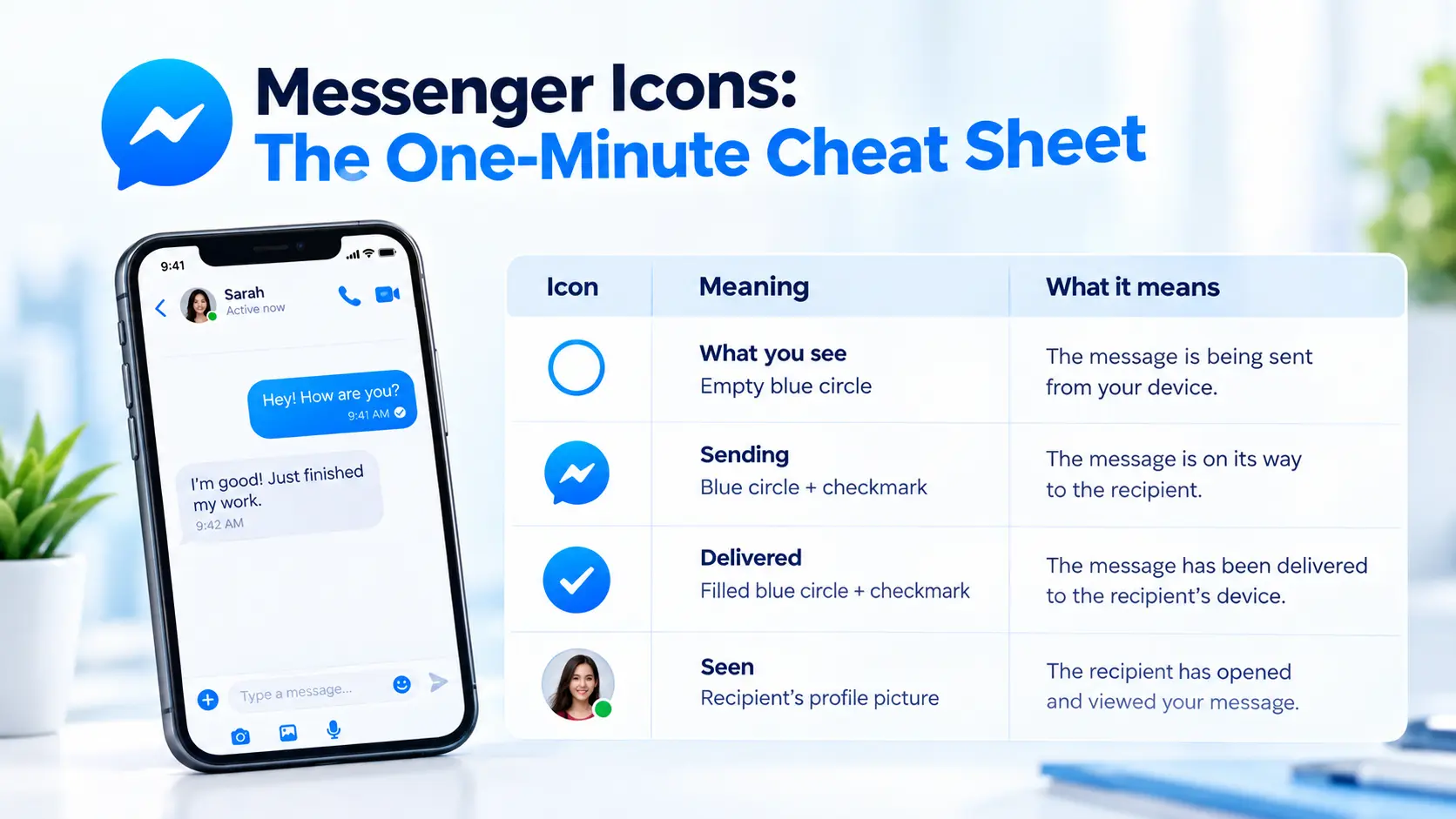
Facebook Messenger Blue Circle vs Sent vs Delivered vs Seen
If you only remember one section from this article, remember this:
Status | Icon | What you can conclude |
Sending | Empty blue circle | Messenger is still sending |
Sent | Blue circle + checkmark | Message has been sent |
Delivered | Filled blue circle + checkmark | Message has been delivered |
Seen | Recipient's profile picture | Messenger registered it as seen |
The Facebook Messenger blue circle therefore changes meaning as the message moves through the status sequence.
The same principle applies when interpreting Messenger icons across individual conversations. Focus on the complete icon state rather than simply asking whether the icon is blue.
Is the Facebook Messenger Blue Circle the Same as the Green Dot?
No.
This is one of the biggest sources of confusion around Messenger.
The Facebook Messenger blue circle relates to the status of a message you sent.
The green dot relates to Active Status.
Meta describes Active Status as an indicator showing when someone is active, currently in the same chat, or was recently active on Facebook or Messenger. It is not the same thing as a message read receipt.
So:
Blue message circle relates to your message status
Green Active Status indicator: relates to activity
Recipient profile picture indicates your message has been seen
Do not use someone's green Active Status as proof that they have opened your specific message.
Why Is My Message Stuck on Sent?
One of the most common questions about the Facebook Messenger blue circle is what happens when the message remains at the Sent stage.
The important point is that the icon alone does not tell you why the message has not progressed.
Possible explanations can involve connectivity, account status, Messenger issues, or other circumstances affecting message delivery. Meta's troubleshooting guidance recommends checking your internet connection, updating Messenger, restarting the app or device, and checking whether there are broader problems affecting messaging.
Does Sent mean I am blocked?
Not necessarily.
A Messenger message status showing Sent but not Delivered is not enough evidence by itself to conclude that someone blocked you.
There can be multiple reasons a message may not progress, so the Facebook Messenger blue circle should not be used as a standalone blocking detector.
This is an important distinction for anyone searching for the meaning of Messenger icons because many online explanations turn a delivery status into a definitive privacy conclusion.
What If Someone Is Active but Has Not Seen My Message?
This is where the difference between Active Status and message status becomes especially important.
Imagine this situation:
You send a message.
The message becomes Delivered.
The person appears active.
Their profile picture does not appear beneath your message.
The Messenger message status is still telling you something specific: Messenger has not registered that particular message as Seen.
The green dot does not override that status.
Someone can be active on Facebook or Messenger without opening up your specific conversation. Therefore, the Facebook Messenger blue circle and Active Status should always be interpreted separately.
What Does a Blue Circle Around a Profile Picture Mean?
There is another blue or colorful circle that users sometimes confuse with the message-status Facebook Messenger blue circle.
A ring around someone's profile picture can be associated with a Story that you have not viewed.
That is a different interface element from the small status circle beside a message.
So, when checking Messenger icons, first identify where the circle appears:
Beside your message: likely message status
Around a profile picture: may relate to a Story
Beside someone's name: may relate to Active Status
Inside the message composer: may have a different function
Location matters.
Messenger Icons: A Simple Decision Tree
If you are unsure what an icon means, use this quick decision tree:
Did you just send a message?
↓
Is there an empty blue circle?
↓
Message is still sending
↓
Is there a blue circle with a checkmark?
↓
Message is sent
↓
Is the circle filled with a checkmark?
↓
Message is delivered
↓
Do you see the recipient's profile picture?
↓
Message has been seen
This gives you a much more reliable way to interpret Messenger icons than guessing from the color alone.
The key is to identify the complete symbol and its position in the conversation.
Quick Examples of Messenger Message Status
Example 1: Empty circle
You send a message and see an empty circle.
Messenger message status: Sending.
The message has not yet moved to the Sent state.
Example 2: Circle with checkmark
The empty circle changes to a blue circle containing a checkmark.
Messenger message status: Sent.
Do not interpret this as Read.
Example 3: Filled circle with checkmark
The circle becomes filled and still contains a checkmark.
Messenger message status: Delivered.
The message has progressed beyond Sent but Seen has not been registered.
Example 4: Profile picture
The recipient's small profile picture appears beneath the message.
Messenger message status: Seen.
This is the clearest visual indication that Messenger has registered the message as viewed.
Conclusion
The Facebook Messenger blue circle is more than just a blue icon. It is part of a message-status sequence that helps you understand what happened after you pressed Send:
Sending → Sent → Delivered → Seen
An empty circle means the message is still sending. A circle with a checkmark means it has been sent. A filled circle with a checkmark means it has been delivered. The recipient's profile picture indicates that Messenger has registered the message as seen.
But conversations today are no longer limited to personal messaging.
For businesses, every conversation can represent a lead, customer question, sales opportunity, or support request. Managing those conversations manually across multiple channels can quickly become inefficient.
Chat360 helps enterprises move from simply managing conversations to intelligently automating them.
From AI Agents and Conversational AI to WhatsApp, Voice AI, RCS and omnichannel customer engagement, Chat360 enables businesses to build connected customer journeys that can engage, qualify, assist and convert customers at scale.
Don't just respond to customer conversations. Make them work for your business.
See how Chat360's Enterprise Agentic AI Platform can transform your customer conversations.
Book a demo with Chat360 and explore what's possible.
Frequently asked questions
No. The Facebook Messenger blue circle beside a message represents a message-status stage. Online or recent activity is represented separately through Active Status.