Voice Analytics
Analytics in the Voice AI platform are broadly divided into two categories , each providing different levels of insights accessible from different sections of the platform. Analytics Categories at a Glance Category Focus
Analytics in the Voice AI platform are broadly divided into two categories, each providing different levels of insights accessible from different sections of the platform.
Analytics Categories at a Glance
Category | Focus | Navigation Path |
|---|---|---|
Campaign Metrics | Performance of specific voice campaigns | Analytics → Marketing → Voice |
Bot Metrics | Performance of individual voice bots | Analytics → Insights → Bot Analytics → Voice Bot |
1. Campaign Metrics
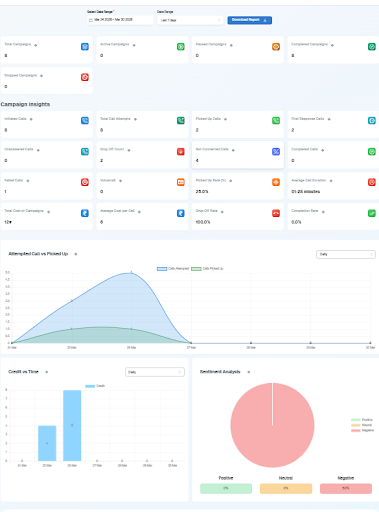
Campaign metrics help you analyze the performance of specific voice campaigns.
Navigation Path
Analytics → Marketing → Voice
What You Can Do
View a list of all campaigns
Drill down into individual campaign performance
Analyze campaign-specific data in detail
Key Campaign Metrics
Call Performance Metrics
Metric | Description |
|---|---|
Total Campaigns | Total number of campaigns created |
Active Campaigns | Currently running campaigns |
Paused Campaigns | Campaigns temporarily stopped |
Completed Campaigns | Campaigns that finished execution |
Call Activity Insights
Metric | Description |
|---|---|
Initiated Calls | Total calls triggered |
Total Call Attempts | Number of attempts made to reach users |
Picked Up Calls | Calls answered by users |
Unanswered Calls | Calls not answered |
Call Outcome Metrics
Metric | Description |
|---|---|
Completed Calls | Successfully completed conversations |
Failed Calls | Calls that failed due to errors |
Not Connected Calls | Calls that didn't connect |
Drop-Off Count | Calls where users disconnected midway |
Efficiency & Rate Metrics
Metric | Description |
|---|---|
Pickup Rate (%) | Percentage of answered calls |
Drop Rate (%) | Percentage of dropped calls |
Completion Rate (%) | Successfully completed calls ratio |
Time & Cost Metrics
Metric | Description |
|---|---|
Average Call Duration | Average duration per call |
Total Cost of Campaign | Total credits consumed |
Average Cost per Call | Cost efficiency per call |
Visual Insights
Campaign analytics also include graphical representations:
Chart | What It Shows |
|---|---|
Attempted vs Picked Calls Graph | Trend of call attempts vs answered calls |
Credit Usage Over Time | Tracks daily credit consumption |
Sentiment Analysis | Shows Positive, Neutral, and Negative interactions |
2. Bot Metrics

Bot metrics provide insights at the individual bot level, independent of campaigns.
Navigation Path
Analytics → Insights → Bot Analytics → Voice Bot → (Outbound / Inbound)
Key Features of Bot Metrics
Separate views for:
Outbound Bots
Inbound Bots
You can:
View overall bot performance
Drill down into specific bot analytics
Analyze performance across different time ranges
Metrics Available in Bot Analytics
These metrics are similar to campaign metrics but focused on a specific bot rather than a campaign.
Call volumes — initiated, received, completed
Pickup and drop rates
Call duration
Credit consumption
Sentiment analysis over time
Connection and failure rates
Drill-Down View (Specific Bot)
When you open a specific bot's detailed view, you will see:
The same set of metrics as the overall view
But filtered only for that particular bot
This ensures consistency across:
Platform-level analytics
Bot-level insights
Summary
Voice Bot Analytics
│
├──  Campaign Metrics
│   ├── Path: Analytics → Marketing → Voice
│   ├── Call Performance  (Total, Active, Paused, Completed)
│   ├── Call Activity     (Initiated, Attempted, Picked, Unanswered)
│   ├── Call Outcomes     (Completed, Failed, Not Connected, Drop-Off)
│   ├── Efficiency Rates  (Pickup %, Drop %, Completion %)
│   ├── Time & Cost       (Duration, Total Cost, Cost per Call)
│   └── Visual Graphs     (Attempts vs Picked, Credit Usage, Sentiment)
│
└──  Bot Metrics
    ├── Path: Analytics → Insights → Bot Analytics → Voice Bot
    ├── Outbound Bot Analytics
    ├── Inbound Bot Analytics
    ├── Overall bot performance view
    └── Per-bot drill-down with same metrics (bot-filtered)
Campaign Metrics | Bot Metrics | |
|---|---|---|
Focus | Campaign performance | Individual bot performance |
Navigation | Analytics → Marketing → Voice | Analytics → Insights → Bot Analytics → Voice Bot |
Drill-down | Per campaign | Per bot (Inbound / Outbound) |
Time Range Filter | ✅ | ✅ |
Sentiment Analysis | ✅ | ✅ |
Credit Tracking | ✅ | ✅ |