Monitor Instagram comments and DMs in real time, analyze audience sentiment, manage interactions and uncover campaign insights from one dashboard.
Social Monitoring for Instagram allows teams to track and manage user interactions including public comments and direct messages across connected Instagram Business Profiles in real time. By organizing and filtering these interactions within a centralized dashboard, businesses can respond more efficiently, analyze audience sentiment, and evaluate campaign performance on Instagram.
Setup and Configuration
Follow the steps below to enable Instagram Social Monitoring in Chat360.
1. Connect Your Instagram Channel
Navigate to Channels → Instagram.
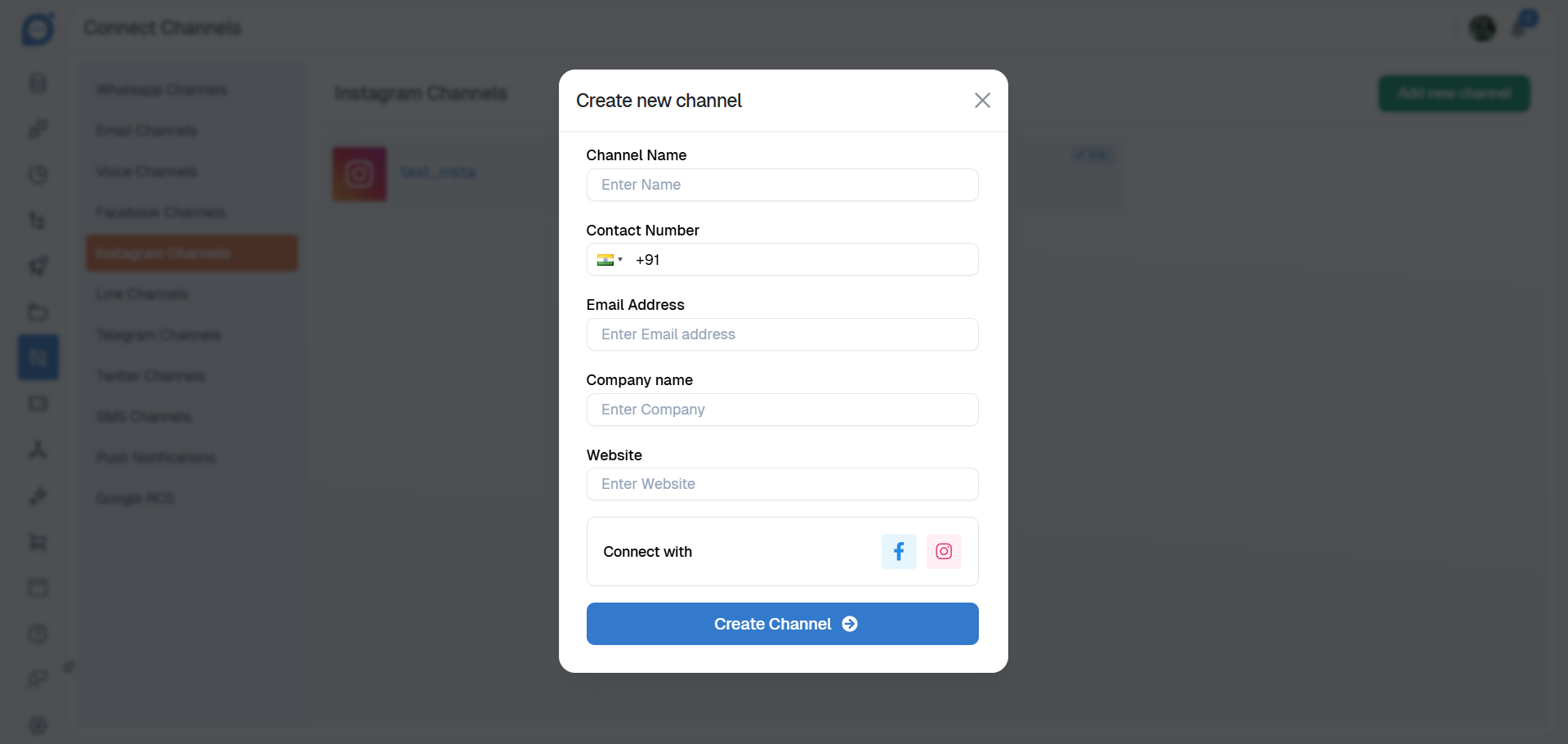
Choose one of the following connection methods:
Connect via Facebook Business Account (linked to your Instagram account)
Connect Instagram Business Account directly
Complete the authentication process to connect your Instagram Business Profile.
2. Enable Social Monitoring
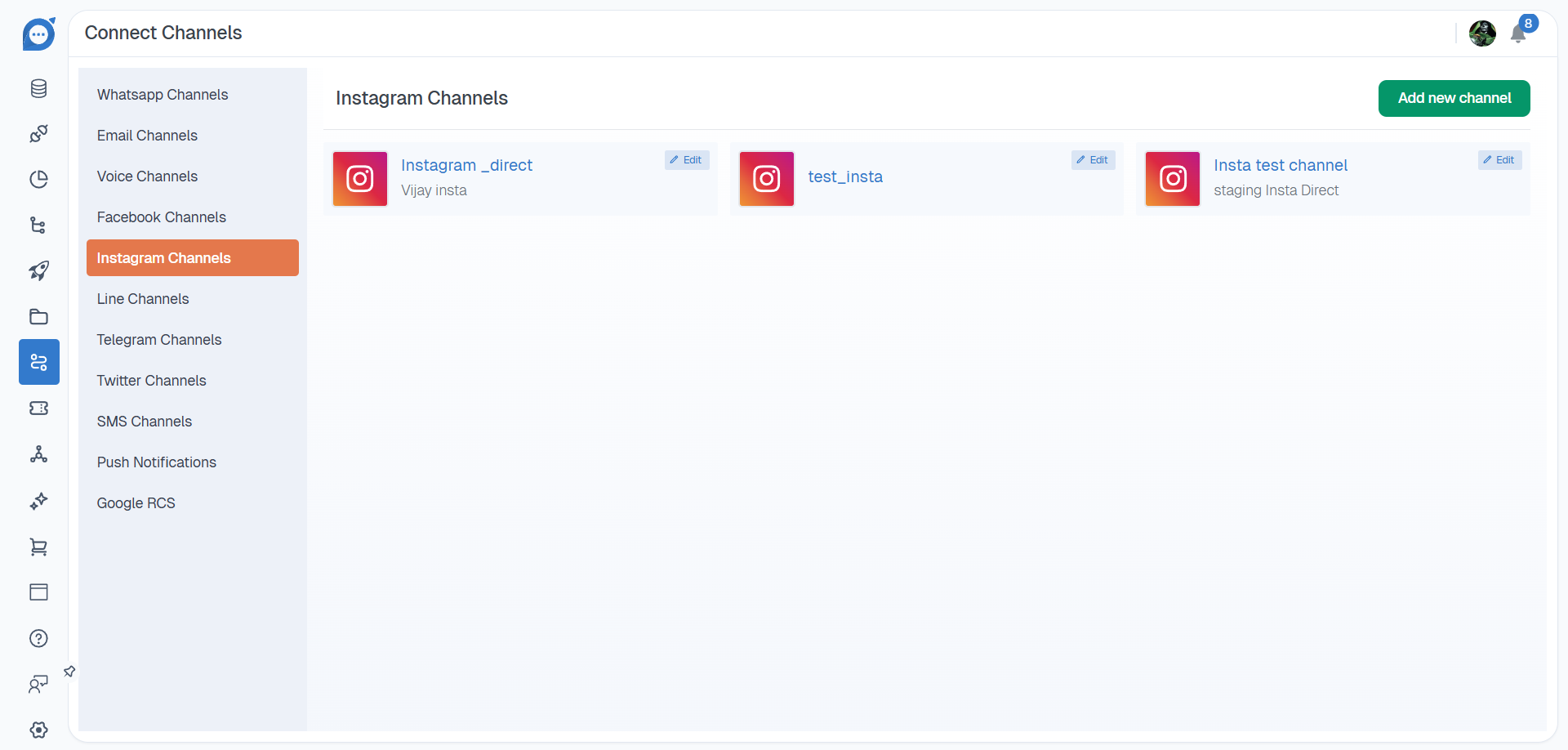
After connecting your Instagram channel, locate the newly created Instagram entry.
Click Edit to open the configuration settings.
Select the Social Monitoring checkbox.
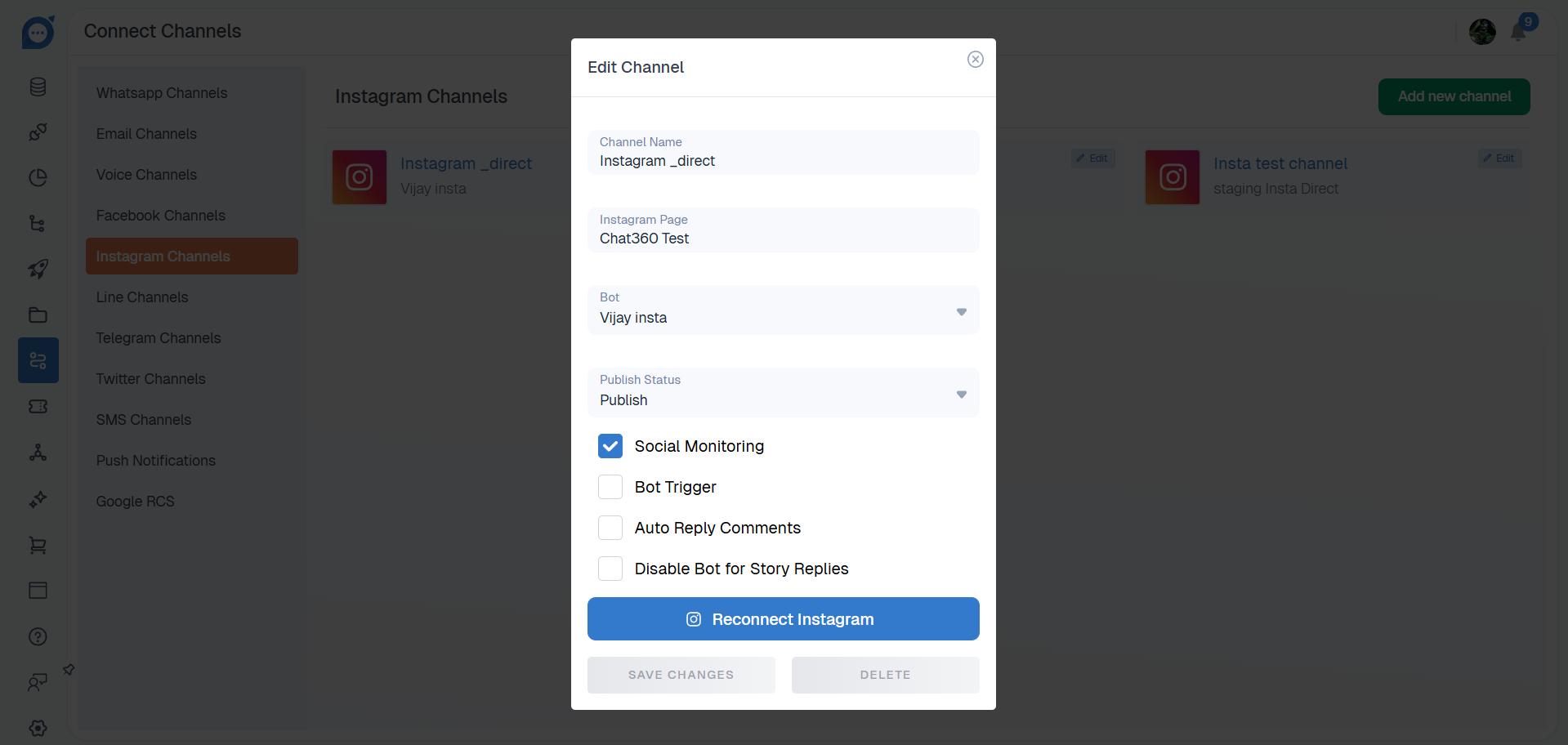
Click Save to activate monitoring for the profile.
Once enabled, Chat360 will begin capturing Instagram comments and direct messages.
Viewing and Filtering Interactions:
Navigate to Social Monitoring → Instagram to access all monitored interactions. You can use the following filters to quickly locate specific comments or messages.
Date Range: Select a specific timeframe to view interactions within a defined period.
Sort Type: Arrange interactions by Oldest or Newest.
Message Type: Switch between Comments & Replies or Private Messages.
Sponsored Status: Filter interactions from Sponsored (Paid) posts or Organic content.
Channel Selector: Switch between multiple connected Instagram Business Profiles.
Language Detection: Filter interactions based on language to monitor multilingual engagement.
Sentiment: View interactions categorized by sentiment:
Positive
Neutral
Negative
Post Filter: Focus on interactions related to specific posts or reels by selecting them from your feed.
Key Benefits:
Real-Time Engagement: Track comments and direct messages as they arrive and respond promptly.
Sentiment-Based Prioritization: Identify negative feedback quickly for faster resolution while highlighting positive engagement.
Multilingual Monitoring: Capture and analyze comments across multiple languages to serve global audiences.
Campaign Performance Insights: Measure engagement on sponsored posts and reels to optimize campaign targeting and messaging.
Focused Workflow Management: Use advanced filters to concentrate on the most important conversations and interactions.
Use Cases:
Product Launch Monitoring: Track early audience reactions and questions on newly launched posts or reels to guide support and marketing strategies.
Crisis Management: Identify spikes in negative sentiment on promoted content and respond with corrective messaging.
Influencer Campaign Tracking: Monitor engagement on influencer collaborations and co-branded posts to evaluate partnership performance.
Customer Support Management: Surface direct messages related to product inquiries or order issues and assign them to support teams.
Content Optimization: Analyze engagement patterns across different content formats—such as carousels, reels, and stories—to improve future content planning.
By using Social Monitoring – Instagram, businesses can stay informed about audience conversations, maintain a positive brand presence, and convert social interactions into actionable insights for better marketing and customer engagement strategies.
Performance Analytics – Instagram
Performance Analytics for Instagram provides a centralized dashboard for measuring engagement across all connected Instagram Business Profiles. By tracking interaction metrics and sentiment trends, teams can better understand audience behavior, refine content strategies, and strengthen community engagement.
Key Metrics
The dashboard displays several key engagement metrics to help evaluate Instagram performance.
Total Comments: The total number of public comments received across all connected Instagram profiles.
Total Ads Comments: The number of comments generated on sponsored or paid posts.
Total Direct Messages: The total volume of direct messages received from users.
Total Private Replies: The number of responses sent privately to users through Instagram messaging.
Sentiment Overview: A percentage breakdown of audience feedback categorized as Positive, Neutral, or Negative.
Likes Overview: The total number of likes received across posts within the past three months.
Visualizations
The analytics dashboard includes visual reports that help teams quickly understand engagement trends.
Sentiment Trend Graph: A line or area chart displaying changes in sentiment—Positive, Neutral, or Negative—over time.
Comments vs. Ads Comments Chart: A bar chart comparing engagement between organic posts and sponsored content.
DM and Reply Volume Chart: A dual-axis chart showing the relationship between incoming direct messages and outgoing private replies.
Likes Timeline: A time-series graph showing total likes over time, helping identify engagement peaks during specific campaigns or posts.
Key Benefits
Comprehensive Engagement Tracking: View all interaction types—comments, direct messages, replies, and likes—from a single dashboard.
Sentiment Analysis: Automatically categorize feedback to quickly identify concerns and highlight positive engagement.
Campaign Performance Insights: Compare engagement on organic posts and sponsored content to optimize advertising strategies.
Trend Identification: Detect increases or decreases in engagement related to specific campaigns or content types.
Strategic Resource Allocation: Identify areas with high engagement or negative sentiment to prioritize responses and support.
Use Cases
Promotion Performance Analysis: Evaluate whether sponsored promotions or giveaways generate higher engagement compared to organic posts.
Customer Support Planning: Predict peak direct message volumes during events such as product launches and allocate support resources accordingly.
Content Optimization: Identify which content formats—such as carousels, reels, or static posts—generate the highest number of likes.
Brand Reputation Monitoring: Track sentiment trends following brand announcements to proactively manage public perception.
Influencer Campaign Evaluation: Compare engagement metrics on influencer collaborations with standard brand posts to measure partnership effectiveness.
Using Performance Analytics – Instagram, businesses can monitor engagement trends, understand audience sentiment, and make informed decisions to improve their Instagram marketing and community management strategies.