Google Reviews
Monitor Google Reviews, track ratings and analyze customer sentiment across locations from one dashboard to respond faster and improve your online reputation.
Social Monitoring for Google Reviews allows businesses to manage and respond to customer reviews directly from the Chat360 platform. By connecting your Google account, you can monitor ratings and review sentiment across multiple business locations in a single dashboard.
This centralized view ensures that all customer feedback is tracked and addressed promptly.
Setup and Configuration
Follow the steps below to enable Google Reviews monitoring in Chat360.
1. Connect Your Google Account
Navigate to Integrations → Google Reviews.
Click Sign in with Google.
Grant the required permissions to allow Chat360 to access your Google Business profiles.
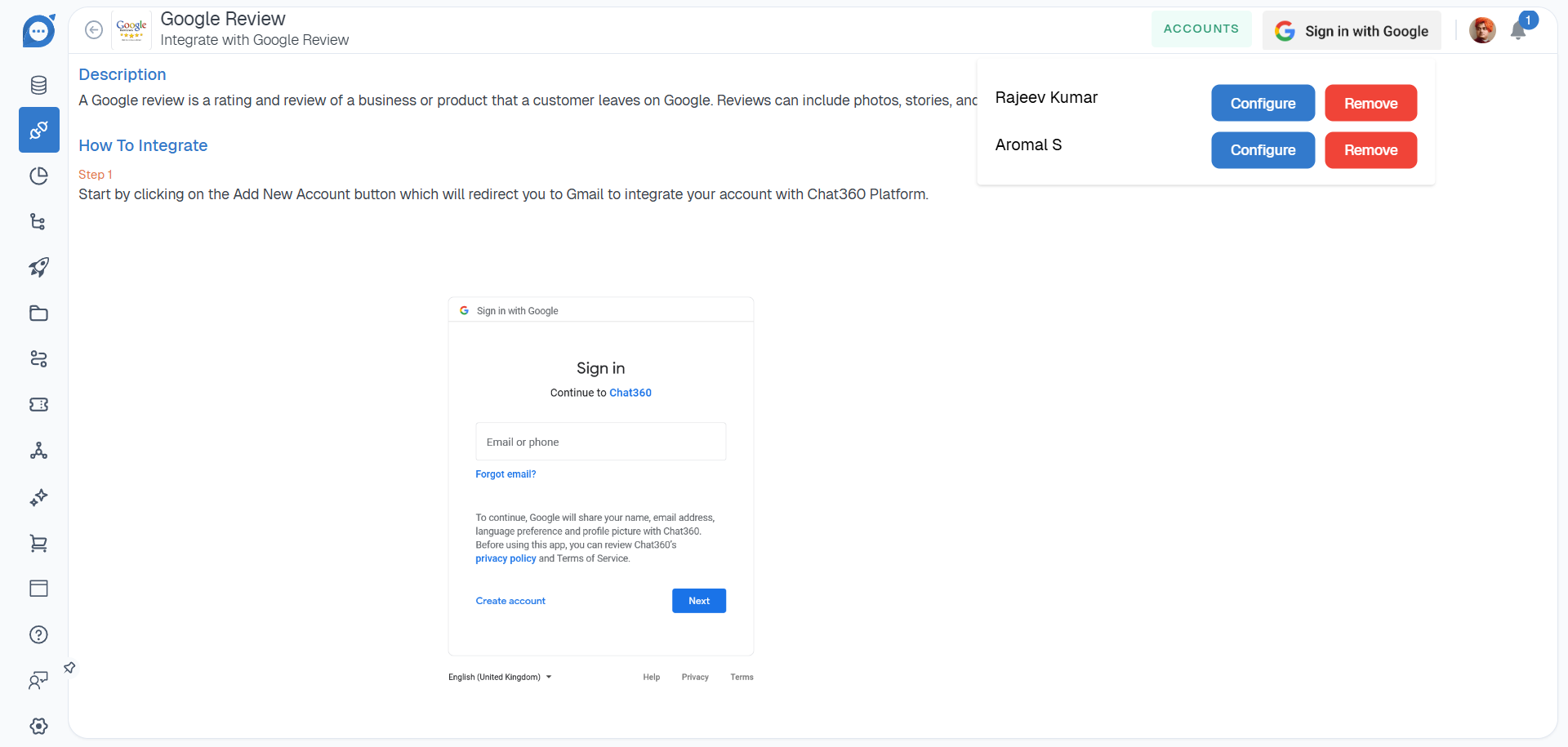
Once authenticated, Chat360 will retrieve the business profiles associated with your account.
2. Select Business Profiles and Locations
After connecting your Google account:
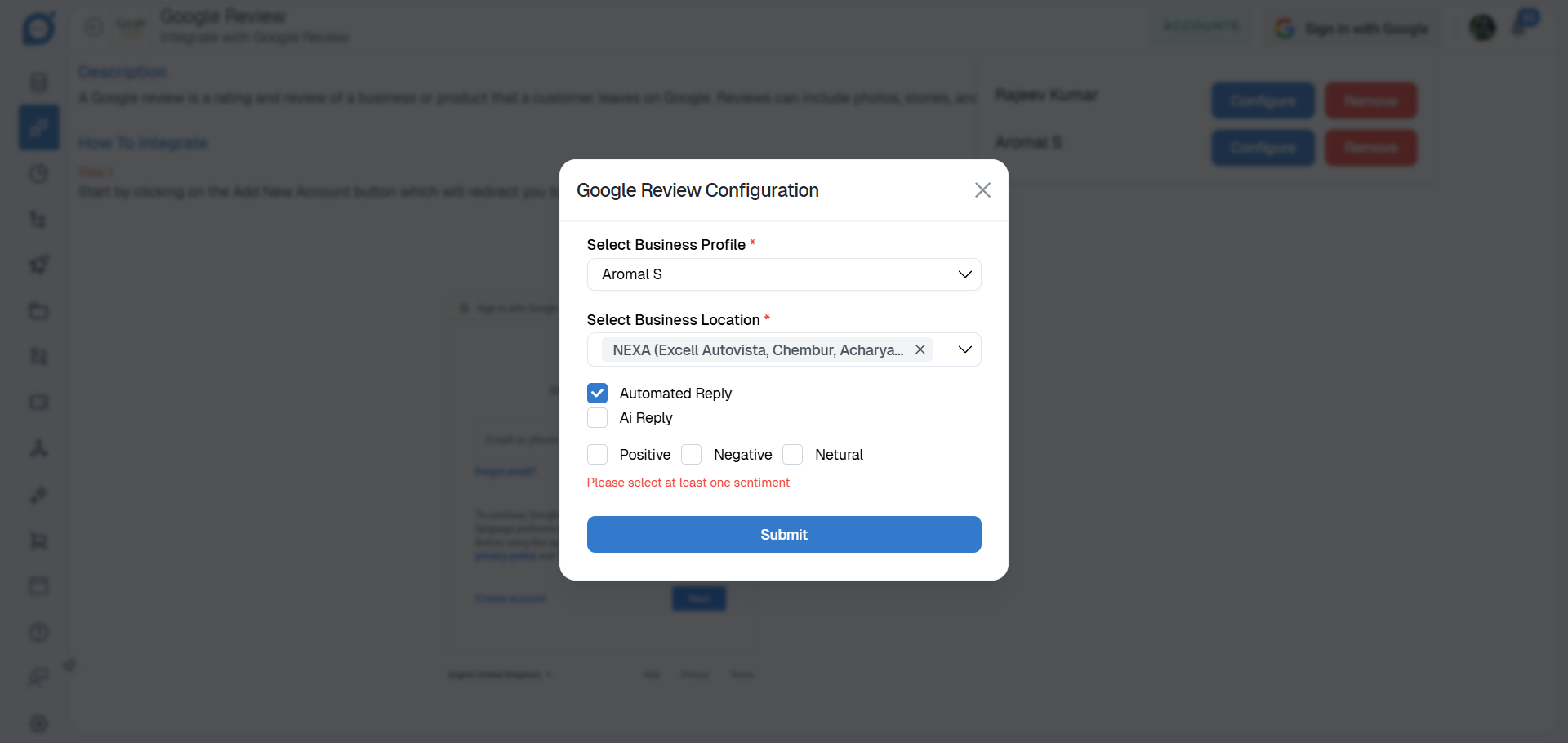
Chat360 will display all linked Google Business profiles and their associated locations.
Select the profiles and locations you want to monitor for customer reviews.
3. Configure Reply Mode
You can choose how responses to reviews will be generated.
AI Reply: Enable this option to automatically generate responses to reviews using AI-based sentiment analysis. Responses will be tailored based on review sentiment, including: Positive reviews Neutral reviews Negative reviews
Static Reply: Disable AI Reply if you prefer to create predefined responses. In this mode, you can define fixed reply templates for each sentiment category.
4. Apply Filters
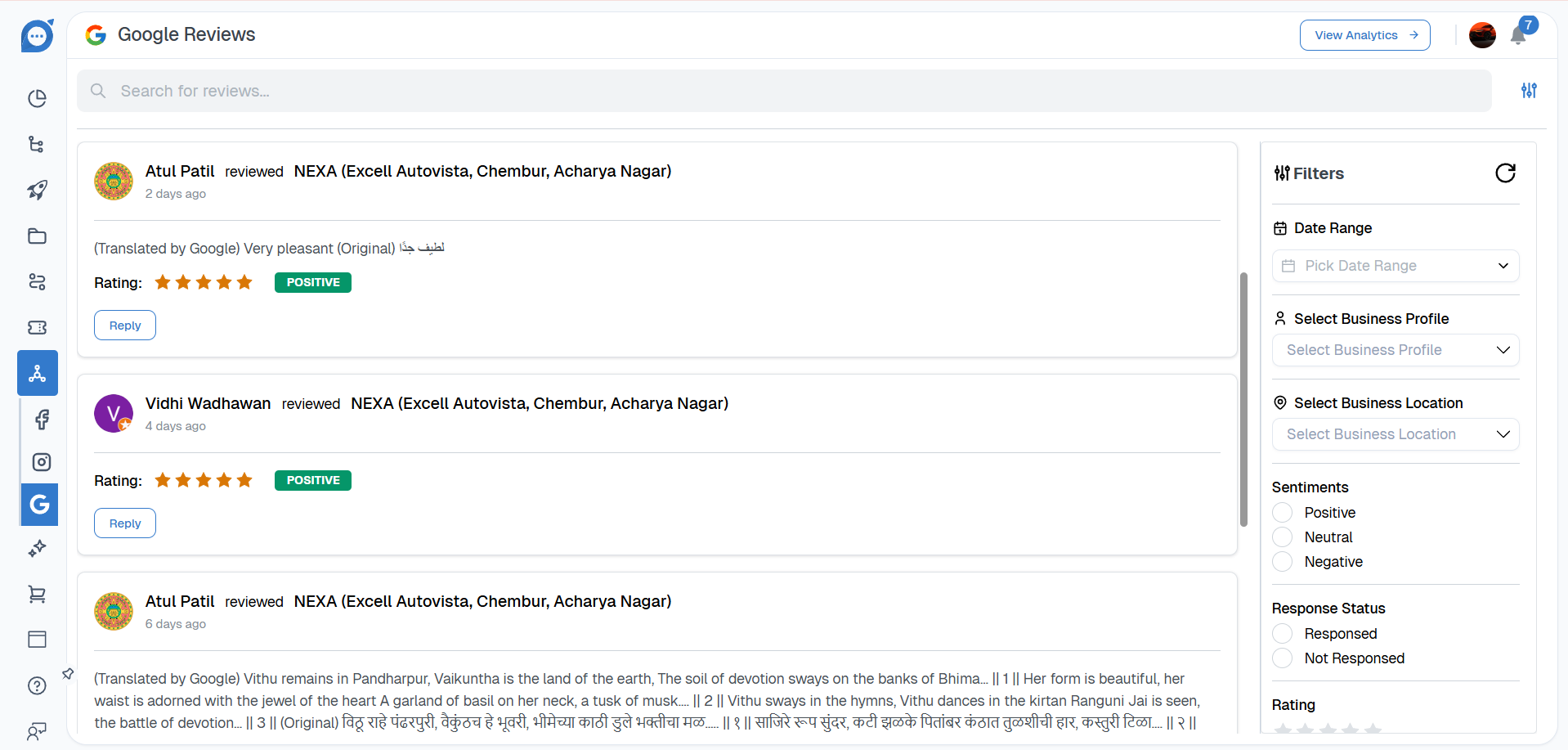
The platform provides several filters to help you locate and manage specific reviews.
Date Range: View reviews within a selected timeframe.
Business Profile and Location: Filter reviews by specific business profiles or branch locations.
Sentiment: Segment reviews by sentiment classification: Positive, Neutral & Negative.
Response Status:View reviews based on response activity: Responded vs Not Responded.
Sort by Rating: Sort reviews by star rating to quickly identify and prioritize lower-rated feedback.
Key Benefits:
Centralized Review Management: View and manage reviews from all Google Business listings in a single dashboard.
Sentiment-Based Prioritization: Quickly identify negative feedback that requires immediate attention while highlighting positive customer experiences.
Automated or Custom Responses: Use AI-generated replies for faster responses or create customized response templates.
Response Monitoring: Track which reviews have been responded to and ensure timely engagement with customers.
Location-Level Insights: Compare customer feedback and ratings across different business locations to monitor reputation and performance.
Use Cases:
Multi-Location Restaurants: Monitor and respond to reviews from different restaurant branches to maintain consistent customer service.
Retail Chains: Automatically acknowledge positive feedback and quickly address complaints to improve customer satisfaction.
Hospitality Businesses: Track guest feedback trends to improve operational processes and service quality.
Service-Based Businesses: Automatically flag low-rated reviews (such as 1–2 stars) for immediate follow-up.
Regional Performance Monitoring: Compare ratings across locations to identify high-performing branches and areas that require improvement.
By using Social Monitoring – Google Reviews, businesses can effectively manage their online reputation, respond to customer feedback faster, and gain valuable insights into customer satisfaction across multiple locations.
Performance Analytics – Google Reviews
Performance Analytics for Google Reviews provides a centralized dashboard to monitor and evaluate your business’s online reputation. By aggregating ratings and review trends across all connected Google Business profiles, the dashboard helps teams understand customer sentiment, maintain service quality, and respond effectively to feedback.
Key Metrics:
The dashboard displays key metrics that provide insights into review performance and customer satisfaction.
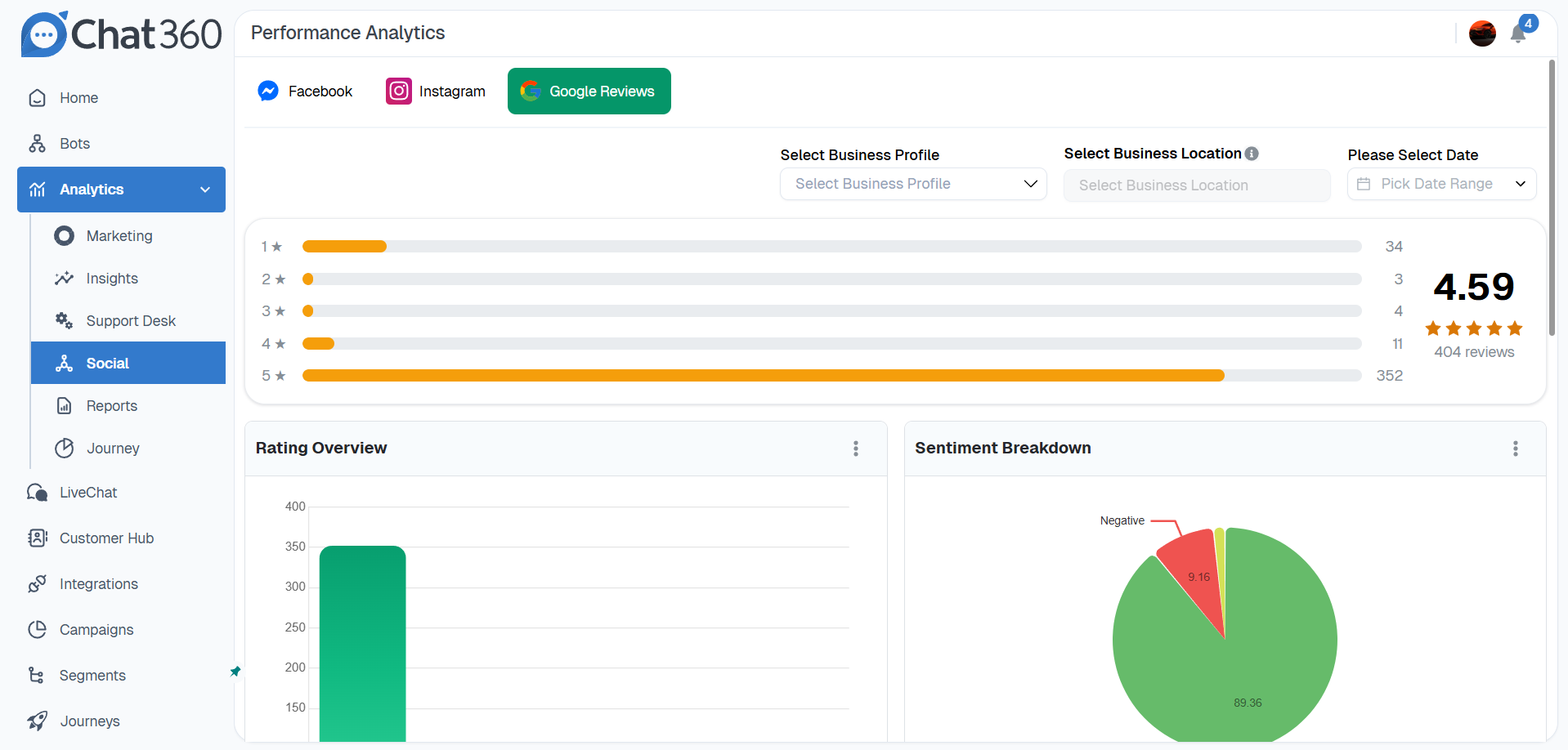
Overall Average Rating: Displays the combined star rating (1–5) across all monitored profiles, along with the total number of reviews received.
Profile and Location Ratings: Provides a breakdown of the average rating and review count for each connected business account and its individual locations.
Rating Distribution: Shows the number of reviews for each star level (1-star to 5-star), helping identify strengths or areas that require improvement.
Sentiment Breakdown: A visual representation of review sentiment categorized as Positive, Neutral, or Negative, offering a quick overview of customer satisfaction.
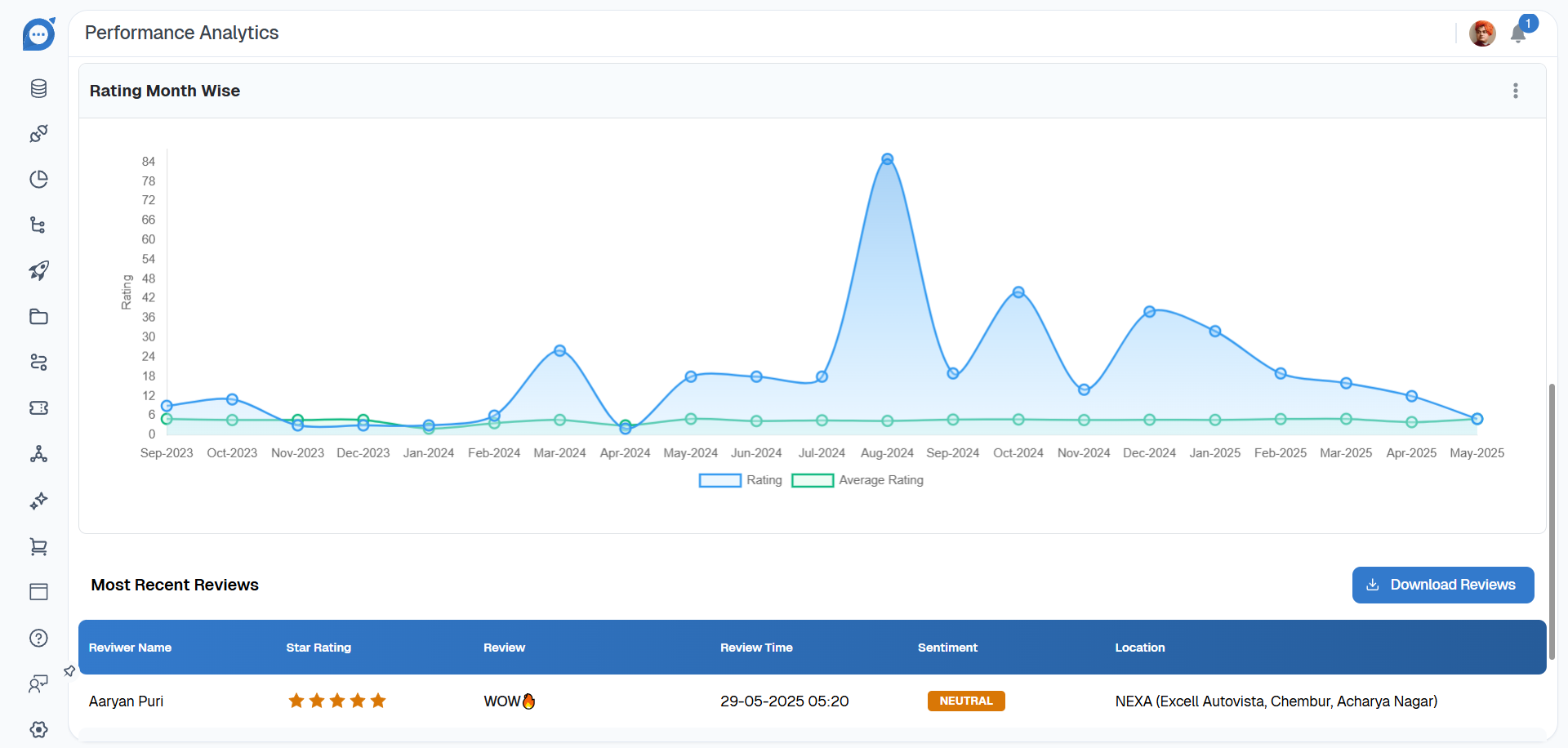
Monthly Rating Trends: Tracks changes in average ratings over time, highlighting trends in customer perception.
Recent Reviews Spotlight: Displays the most recent customer reviews, enabling teams to quickly respond to new feedback.
Visual Analytics:
The dashboard includes several visual reports to help interpret review data more effectively.
Star Distribution Bar Chart: Shows the volume of reviews across each star-rating category, making it easy to identify rating imbalances.
Sentiment Pie Chart: Provides a visual breakdown of positive, neutral, and negative reviews.
Trend Line Graph: Displays the overall average rating trend over the past 6–12 months, helping identify improvements or declines in reputation.
Recent Reviews Panel: Highlights the five most recent customer reviews, including their star rating, date, and location.
Navigation and Usage
Accessing the Dashboard: Navigate to Analytics → Support Desk and select Google Reviews.
Using Filters: Refine the displayed data using available filters, including: Date Range, Business Profile, Location, Sentiment.
Exporting Reports: Click Download Report to export the current view as a CSV file for offline analysis or reporting.
Taking Action: Use the insights from the dashboard to:
Generate AI-based responses to reviews
Improve customer service processes
Identify locations that require operational improvements
By using Performance Analytics – Google Reviews, businesses can continuously monitor their reputation, respond to customer feedback more effectively, and improve service quality across all business locations.