Monitor Facebook comments, messages, sentiment and campaigns in one dashboard. Track engagement, analyze performance and respond faster to customers.
Social Monitoring for Facebook allows businesses to track and respond to user interactions, such as comments and private messages on their Facebook Business Pages directly from the Chat360 platform.
By consolidating these interactions into a single dashboard, teams can engage with their audience more efficiently, monitor sentiment, and gain insights into campaign performance without switching between multiple platforms.
Setup and Configuration
Follow these steps to enable Facebook Social Monitoring in Chat360.
1. Connect Your Facebook Channel
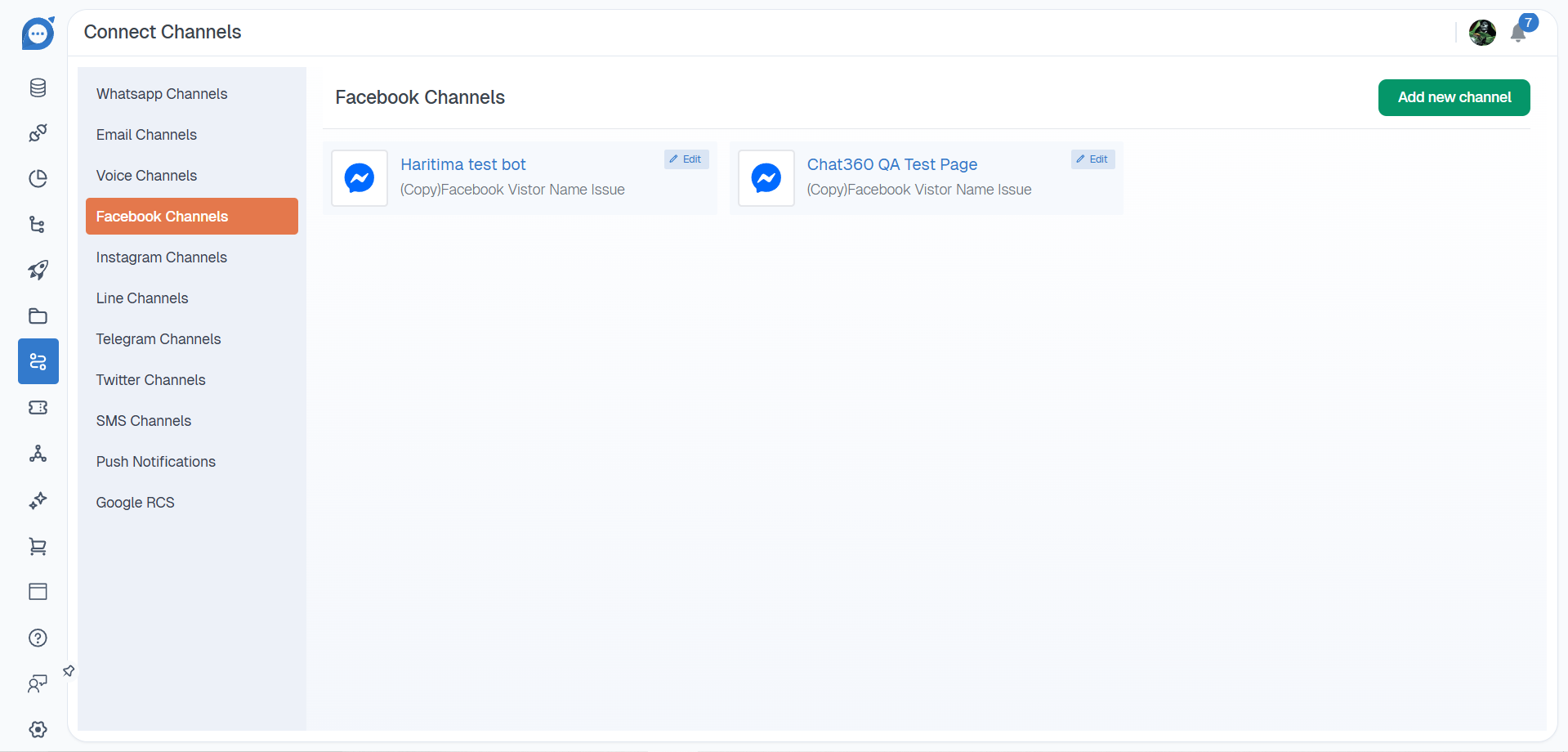
Navigate to Channels → Facebook Channels.
Click Add New Channel.
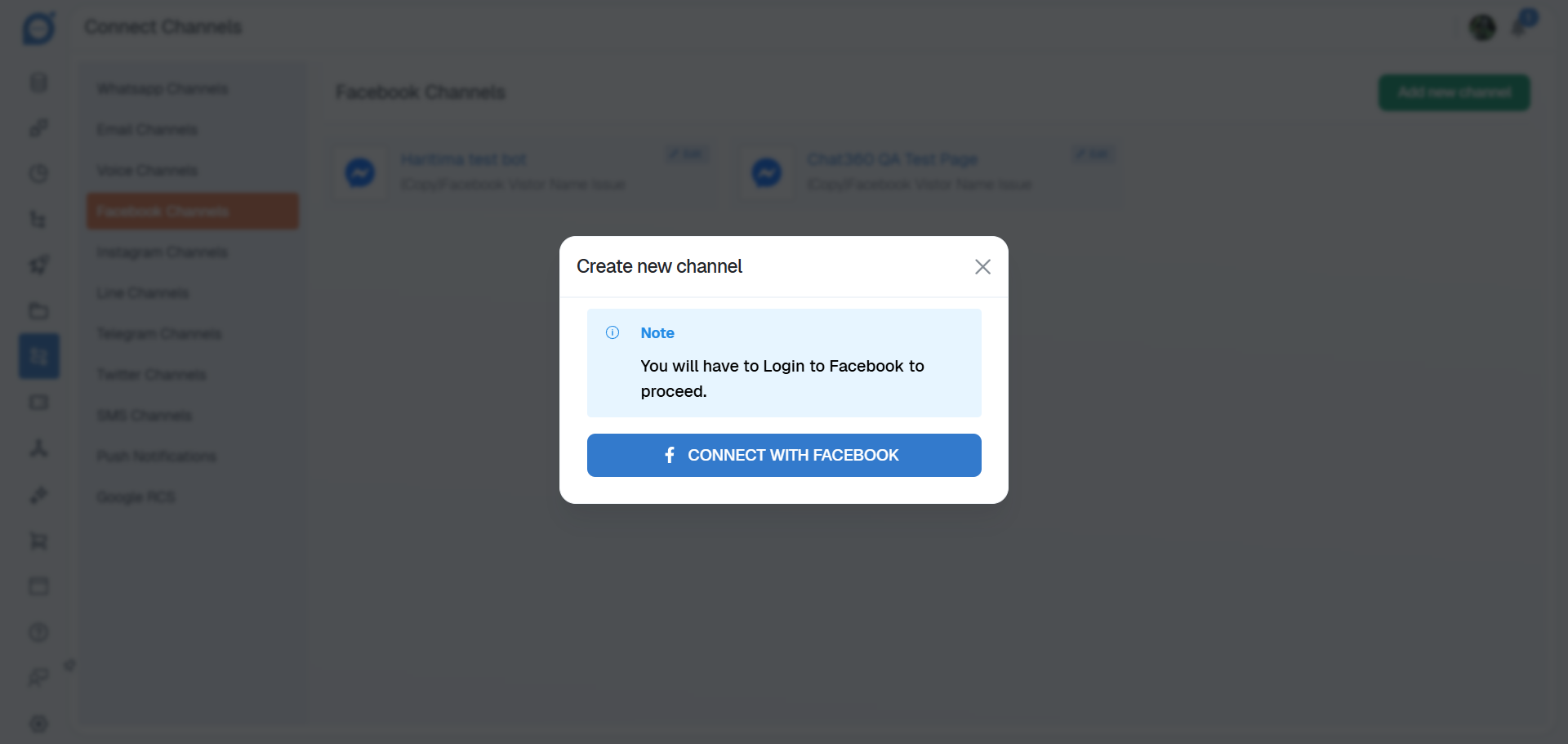
Authenticate your Facebook Business account.
Grant the required permissions to allow Chat360 to access your Facebook Page data.
2. Enable Social Monitoring
Locate the newly connected Facebook profile.
Click Edit to open the configuration settings.
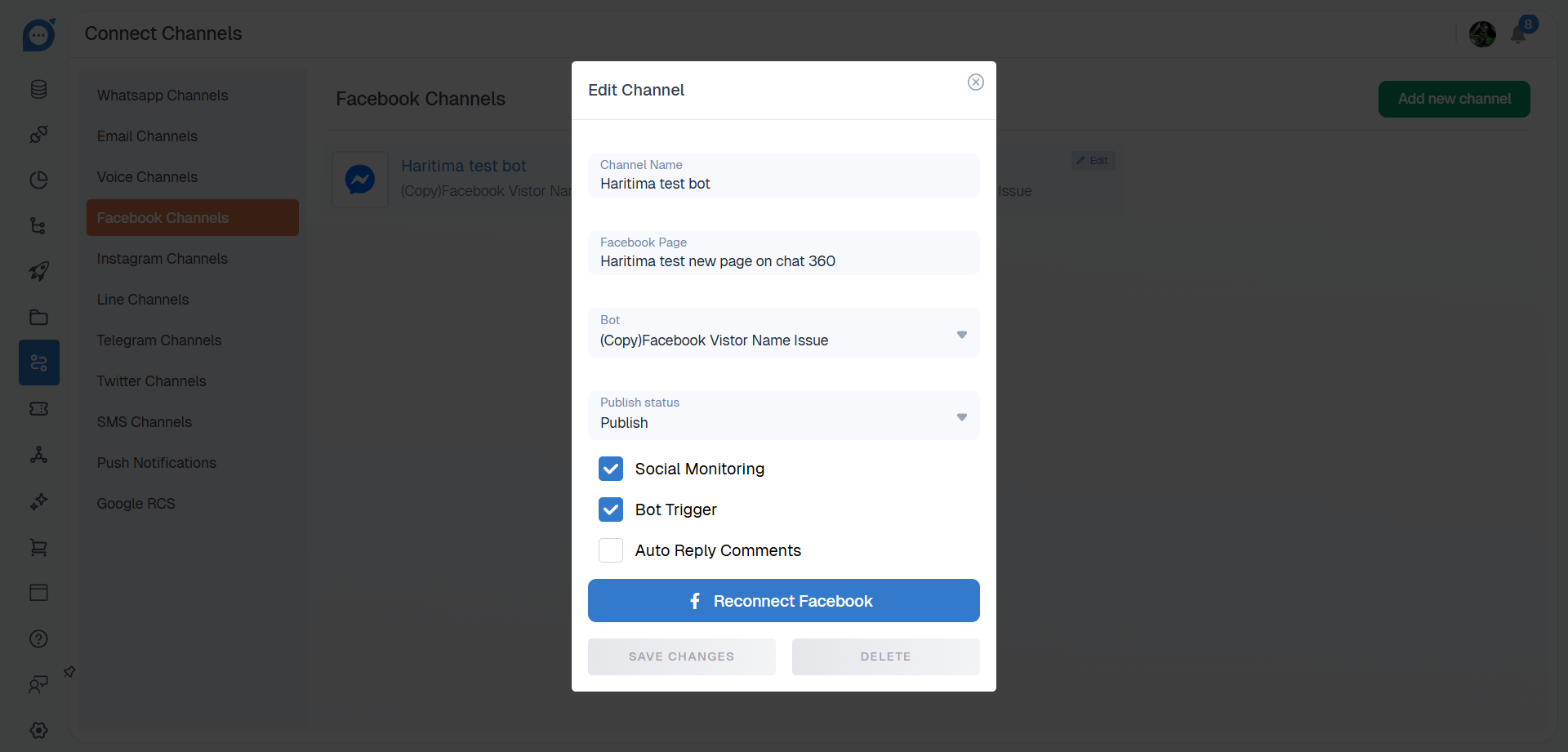
In the configuration window, enable the following options:
Enable Social Monitoring for Comments & Replies
Enable Social Monitoring for Private Messages
Click Save to activate social monitoring.
Viewing and Filtering Interactions
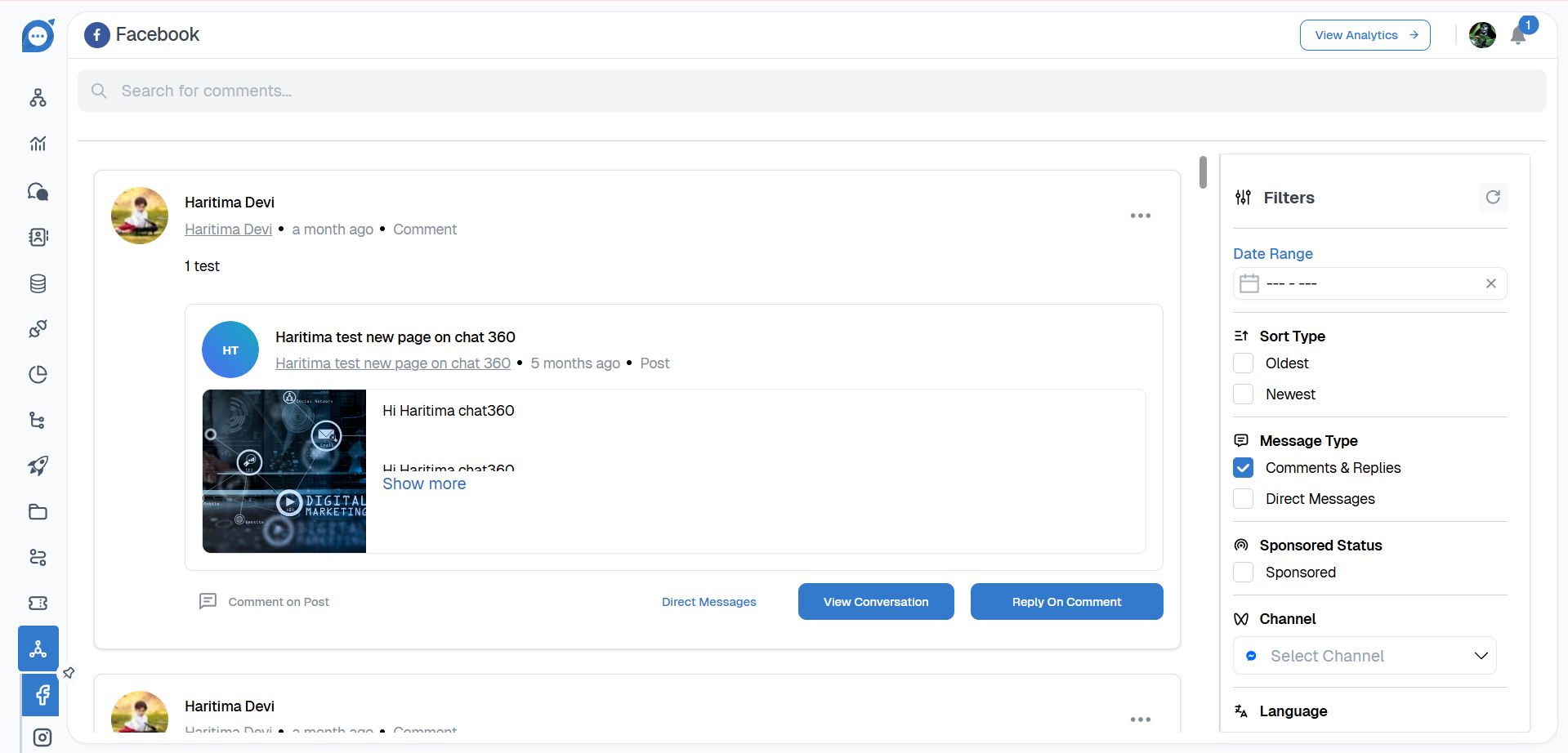
After activation, navigate to Social Monitoring → Facebook to view all collected interactions. To help you locate specific conversations or engagement data, several filtering options are available.
Date Range: Filter interactions within a custom date range.
Sort Type: Sort interactions by Oldest or Newest.
Message Type : Choose between:
Comments & Replies
Private Messages
Sponsored Status: Filter interactions from Sponsored Posts or Organic Posts.
Channel: Monitor interactions across multiple connected Facebook Pages.
Language: Enable multilingual monitoring to capture comments written in different languages.
Sentiment: Filter interactions based on sentiment classification:
Positive
Neutral
Negative
Context Type: Filter interactions by content type such as:Text,Links or Media.
Post Filter: Focus on interactions related to specific posts for targeted engagement.
Key Benefits:
Real-Time Engagement: Respond quickly to customer comments and questions, improving brand responsiveness.
Sentiment Analysis: Automatically classify audience feedback into positive, neutral, or negative sentiment to prioritize responses.
Multilingual Monitoring: Track and manage comments in multiple languages, ensuring global audiences are addressed.
Campaign Performance Insights: Analyze engagement across sponsored and organic posts to improve advertising strategies.
Centralized Interaction Management: Manage Facebook interactions alongside other communication channels within the Chat360 platform.
Use Cases
Customer Support: Identify and resolve customer complaints posted in comments before they escalate.
Community Engagement: Acknowledge positive feedback and user-generated content to strengthen brand relationships.
Crisis Monitoring: Track spikes in negative sentiment after announcements or updates and respond quickly.
Ad Performance Analysis: Evaluate engagement and sentiment differences between sponsored and organic posts.
Influencer Campaign Tracking: Monitor engagement on influencer-related posts to measure the effectiveness of collaborations. Using Social Monitoring for Facebook, businesses can stay connected with their audience, manage brand reputation, and optimize social media engagement strategies through a unified monitoring system.
Facebook Performance Analytics
Facebook Performance Analytics provides a centralized dashboard for monitoring engagement across your connected Facebook Pages. It aggregates key interaction metrics such as comments, ad engagement, direct messages, private replies, and sentiment trends to give teams a clear view of how audiences interact with their content.
By analyzing these metrics over time, businesses can refine their content strategies, evaluate campaign performance, and proactively manage community engagement.
Key Metrics:
The dashboard displays several important metrics that help measure Facebook engagement:
Total Comments: The total number of public comments received across all connected Facebook Pages.
Total Ads Comments: The number of comments generated on sponsored or paid posts. This metric helps measure engagement with advertising campaigns.
Total Direct Messages: The total number of incoming messages from users through Facebook Messenger.
Total Private Replies: The number of private responses sent by the Page to users.
Likes Overview: The total number of likes received across all posts within the last three months, reflecting overall audience engagement.
Sentiment Overview: A breakdown of public comment sentiment categorized as Positive, Neutral, or Negative within the selected timeframe.
Visual Analytics:
The dashboard also includes visual reports that help teams quickly interpret engagement trends.
Sentiment Trend Graph: Displays how audience sentiment changes over time, helping identify shifts in user perception or campaign reception.
Engagement Breakdown Charts: Bar or line charts that compare key engagement metrics such as:
Total Comments vs. Ads Comments
Direct Messages vs. Private Replies
These comparisons help distinguish between organic engagement and paid campaign responses.
Likes Timeline: A line graph showing daily or weekly like activity, highlighting peaks and drops in audience engagement.
Key Benefits:
Holistic Performance Monitoring: Track both organic and paid engagement metrics from a single dashboard.
Campaign Performance Insights: Compare interactions on sponsored posts and organic content to evaluate campaign effectiveness.
Proactive Community Management: Identify increases in negative sentiment early and address issues before they escalate.
Content Optimization: Analyze comment activity and like trends to determine which types of content perform best.
Customer Experience Insights: Monitor direct message volumes and private replies to ensure timely and effective customer support.
Use Cases:
Product Launch Monitoring: Track increases in comments and engagement during product announcements to evaluate audience reactions.
Crisis Management: Detect spikes in negative sentiment and respond quickly with corrective messaging or escalation if needed.
Promotional Campaign Analysis: Evaluate which advertising creatives generate the highest levels of engagement, including comments and likes.
Customer Support Performance: Compare direct message volumes with private replies to measure response times and service efficiency.
Strategic Content Planning: Use engagement trends from the past three months to plan content schedules around periods of high audience activity.
By using Facebook Performance Analytics, teams can make informed decisions, improve engagement strategies, and maintain a positive community presence through continuous monitoring and optimization of Facebook interactions.