Private Note
Use Chat360 Live Chat Private Notes for confidential agent communication, customer context, internal instructions and support-team collaboration.
A private note is an internal message that agents and team managers can use for communication within a chatroom. It is not visible to the end user but helps provide context when reassigning chats between agents.
For example, if a Team Manager reassigns a chat to another agent, they can add a private note to share important details about the conversation.
How to add a private note?
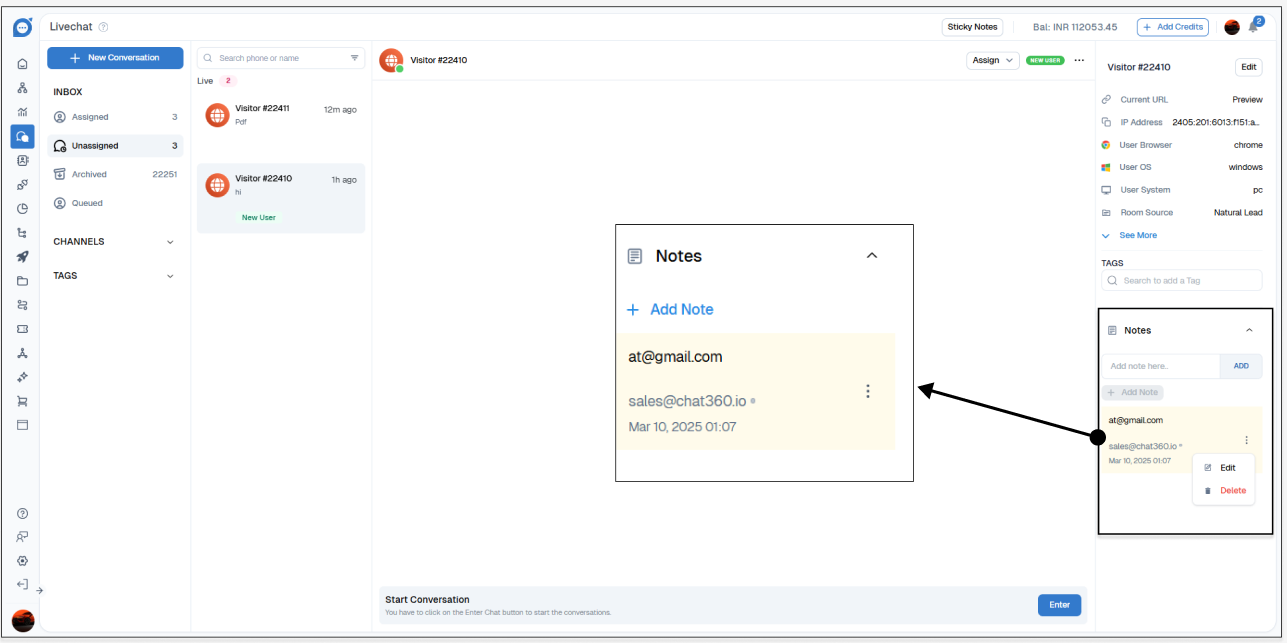
Open the chatroom where you want to add a note.
On the right side, click on the "Notes" option.
Click on the "+" (Add Note) button.
Enter the note content and click "Add".
The note will now appear under the "Notes" section.
Editing or Deleting a Private Note
To edit or delete a note, click on the three dots next to the note and select the appropriate action.