Block Number
Spam taking over your WhatsApp inbox? Block unwanted contacts instantly, choose a block duration and manage blocked numbers from one place.
The Block Number feature allows agents to prevent unwanted or abusive contacts from reaching your WhatsApp Live Chat. Blocked numbers are temporarily restricted from messaging your business, and can be managed centrally in your settings.
How to Block a Number
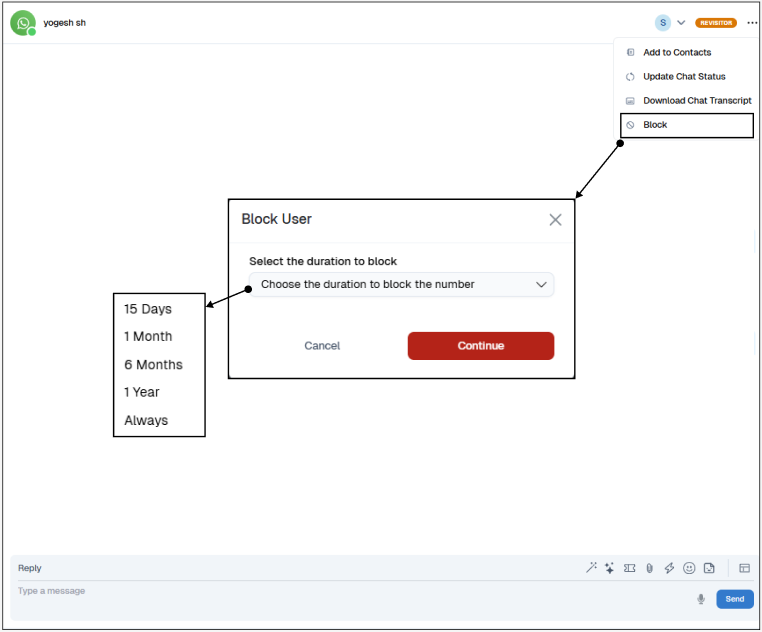
Open Live Chat: Launch Live Chat and enter the WhatsApp chat room for the contact you wish to block.
Access Menu: Click the ⋮ menu in the chat header.
Select Block: Choose Block from the dropdown.
Set Duration: Pick how long to block the number (e.g., 1 day, 7 days, permanent).
Confirm: Click Continue to enforce the block.
Manage Blocked List: View or modify all blocked numbers under Settings → Blocked Numbers.
How to Unblock a Number
Reopen Chat Room: Navigate back to the WhatsApp chat with the blocked contact.
Open Menu: Click the ⋮ menu in the chat header.
Select Unblock: Click Unblock to restore messaging privileges.
Confirmation: The number is immediately removed from the block list and can resume chatting
